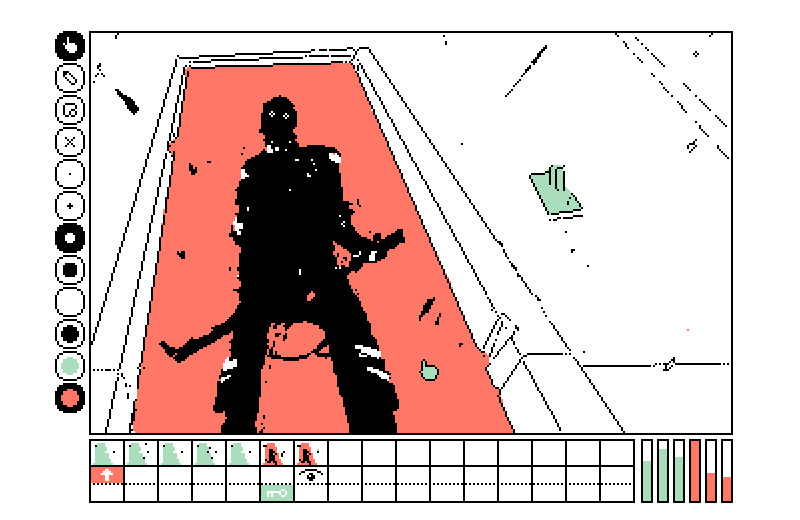

Flick is a point-n-click engine.
Flick is an implementation of Increpare's Flickgame designed for Varvara. Navigation is done by reading the color at the clicked location in a slide and jumping to the associated scene.
Tools
There are four tools: a pointer to jump between slides, a brush to paint pixels of a selected color, a link brush to paint pixels of the link color under the outlines, and a wipe tool that removes the selected color from the scene.
Scenes can be copied with ctrl+c and pasted with ctrl+v. A 1-bit image created with Noodle(width:0x28, height: 0x19) can be pasted ctrl+shift+v.
Links
Below the canvas is the timeline with previews for each scene, underneath that are the links.
Links enable colors to be used for moving between scenes, a link color must be selected for a new link to be created, clicking on a cell in the link timeline creates a link. Clicking on the eye icon toggles between pausing upon entering the scene, and automatically changing to the next scene after a delay of 8 ticks at 60fps.
Locks
Locks can disable a link until a scene has been visited. It's useful for locking events behind certain actions, for example, waiting for a key to be collected before a door can open. Clicking on a cell in the link timeline creates a lock. Press esc to reset all locks.
The viewer application updates a value that is holding the visited scenes, and each link color holds the required scenes that need to be visited in order for that link color to be enabled.
Build
Your flick project is saved as a file named project.flick, which
contains the slides in the flick format. You can use Flicker to convert a project file into a Uxn rom.
uxnemu flick.rom   # Draw something, to create project.flick
uxncli flicker.rom # Run converter, to create project.rom
After running the converter, you should see a project.rom
file, next to your project.flick file. To get a web playable link,
open the rom file in uxn5, and click Share.
Format
The project file is a series of 16 scenes of 16384 bytes each. Each scene is made of 320x200 canvases data stored as CHR tiles, followed by 2 bytes holding the scene number for each link color, and 3 bytes for the RGB values of the scene's links colors.
Scene[0x4000]
	Canvas[0x3e80, 0x28 * 0x19 * 0x10]
		( 1000 chr tiles, 16 bytes each  )
	Metadata[0x0180]
		link1: 1 byte[0x00-0x0f]
		link2: 1 byte[0x00-0x0f]
		R: 1 byte, hb color2r[0x0-0xf], lb color3r[0x0-0xf]
		G: 1 byte, hb color2g[0x0-0xf], lb color3g[0x0-0xf]
		B: 1 byte, hb color2b[0x0-0xf], lb color3b[0x0-0xf]
		lock1: 2 bytes[0x0000-0xffff]
		lock2: 2 bytes[0x0000-0xffff]
		time: 1 byte[0xff]
		... unused metadata
- Source, Latest
- Source(converter), Latest
- Repository, Uxntal